How to Adjust the Volume on the RAZ Phone?Updated 4 months ago
The RAZ Memory Cell Phone is designed to simplify communication, but some features and limitations can surprise new users.
To adjust the call or ringer volume:
- Press and hold the ON/OFF (Power) button for 2 seconds.
- A screen will appear with options: Emergency – Power off – Restart.
- Tap the top volume button on the side of the phone once.
- You’ll see a screen with two volume controls:
Phone icon = Call volume
Music note icon = Ringer volume
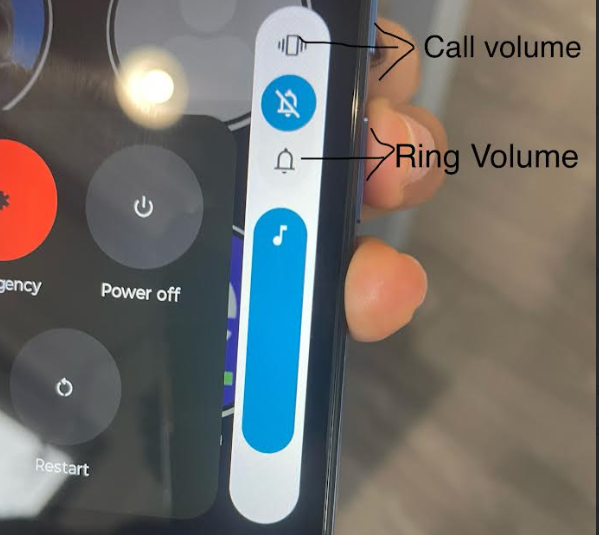
Use your finger to adjust each slider to the desired level.
Note: This method lets you control both the ringtone and the speaker volume for calls and can only be done on the actual phone
If you're looking for more information about using your RAZ Memory Cell Phone or its accessories, including how to set up and troubleshoot your device, we recommend checking the User Guide